Stems & analysis
Separate a song into parts, and let the app hear tempo and hits for you.
Every source can be listened to three ways: separated into stems, analyzed for tempo and key, and scanned for transients. All three run in the background and cache with the source — you ask once, and the answer stays.
Stem separation
One click splits a source into Vocals, Drums, Bass, and Other, plus three derived mixes: Instrumental (no vocals), No Drums, and Drums & Vocals. On Apple Silicon this runs on the GPU; a full song takes about as long as a coffee refill. Settings → Playback chooses the separation quality — Fast, Balanced, or High Quality.
What the stems open up:
- Chop the vocal without the band. Select the vocal stem and your pads play isolated voice.
- Mute the drums and be the drummer. Play the Instrumental stem as a backing loop and cut your own hits over it.
- Swap a clip’s audio after the fact. A chopped clip can trade its audio for any stem of the same moment — the picture keeps playing, the sound changes clothes.
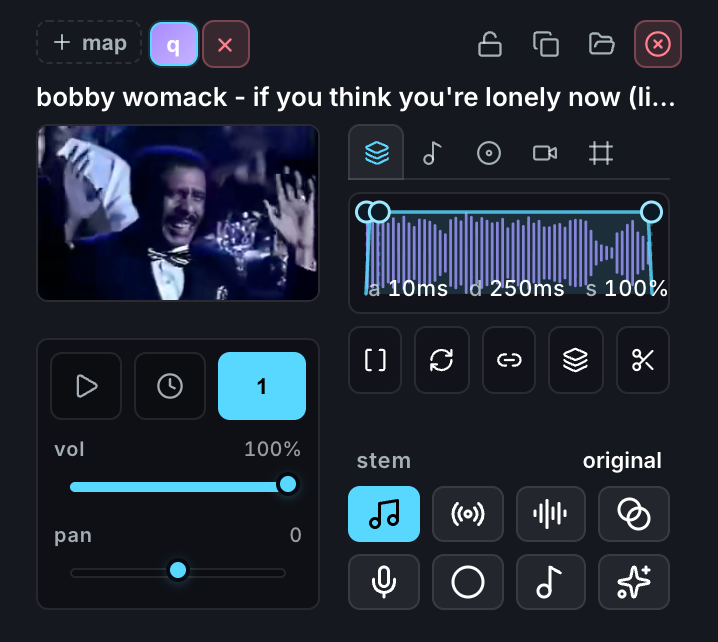
Guide stems while chopping
While chopping, the selected stem controls what you look at, what you hear, and what the Hits tool analyzes. It does not change the media stored in the new clips: chops stay backed by their original source.
Why that matters: vocals are legato, with smeared onsets and few clean transients. Drums are a grid of them. So chop a vocal against the Drums & Vocals stem, where the detector has something to grab, and swap the resulting clips to clean vocals afterwards. Chopping stays about boundaries, and stem choice stays editable at any time.
Beat analysis
The app detects tempo, beats, bars, and key for any source. That feeds everything rhythmic: beat chopping, tempo sync, “adopt this BPM,” count-ins.
Detection is good but corrigible. When it hears double-time — 184 for a 92 BPM song — press ½x. When the downbeat is off, put the playhead on the real one and press Set bar 1 here. Corrections persist, so the app won’t re-argue about a source you’ve already settled.
Transient detection
Transients are the onsets the Hits tool uses. They’re detected per source and per stem, each carrying a strength — which is what makes “give me the 16 best hits” a meaningful request rather than “give me 16 of them”. Each cut is then refined to the exact sample where the attack begins, so pads speak the instant you press them.
Housekeeping
Stems and analysis are regenerable, so they’re the first thing to clear when a project gets heavy. Settings → Storage → Delete stems frees that space for one project or all of them.